
Android Contact’s Birthdays In Your Calendar
March 28th, 2010I’ve had my Android phone a week and a half now and I love it. It brings everything together in to one phone. Perhaps that is why they called it the Nexus One?
But there was one “link” missing. If you spent time entering birthday information for as many of your contacts as possible, they don’t show up in your calendar. Even my girlfriend’s Blackberry does this, surely Android can. I had downloaded an App from the market call EboBirthday. While the app worked, it still had a flaw. The birthdays didn’t show up in you calendar. If you wanted to see what birthdays were coming up, you had to actually open up the EboBirthday app. And on top of that, if you added in any new birthday information, you had to manually resync the EboBirthday app. Rats… this isn’t the best solution.
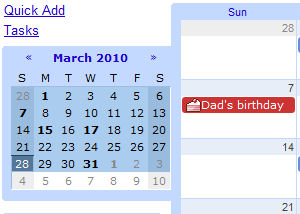
Well, last night I was playing around and Google Calendar, and there is actually an option tucked away, built right in to Google Calendar, that lets you show your contact birthday infromation right on the Calendar!
Here is how you add it on:
Go to the Google Calendar web interface on your computer (google.com/calendar).
1) Click the settings button in the upper right
2) Click the “Calendars” settings tab
3) In the Other Calendars section click “Browse Interesting Calendars”
4) Click the More tab here
5) You should see an item labeled “Contacts’ birthdays and events”, click the Subscribe link. (While you’re in here, you might want to poke around. There may be some other calendars you’re interested in adding in to your own as well, such as holidays and stuff!)
That’s it! In a couple minutes, all your contact birthdays will show up on the Calendar in your phone. How cool is that?
While this is a nice feature to have available, it highlights one of the issues with Android and Google integration right now. When you’re looking for a setting, it’s not always in the most obvious place, and some times you can only change it on the web. However, I do expect as Android matures, we will see a lot more features and options added directly in to the Android OS. I love Android and I suspect will be sticking with it for a long time to come!

HOME


April 6th, 2010 at 1:08 pm
Thank you for the b-day info! I looked all around for this and you did it!
April 6th, 2010 at 1:58 pm
Glad it helped you out Terry! As I said, hopefully Google will “un-bury” some of these nice features in future Android releases
April 8th, 2010 at 5:37 am
ThX!!
Just the answer I was l00king for!
April 8th, 2010 at 6:37 am
Brilliant, I would never have found that, thanks
April 24th, 2010 at 6:08 pm
Thanks for that – a feature I was missing.
April 28th, 2010 at 2:11 pm
Really really helpful
May 12th, 2010 at 2:02 am
Thats was nice
Been looking for this
Thanks a bunch.
August 10th, 2010 at 7:34 am
Warning Warning Warning!
I performed this on my Nexus One and lost all the notes fields That I had added to my phone by hand. This seems to be a one way sync, meaning that information from Gmail is loaded onto your phone without regards for these fields. Use caution, backup or export your phone contacts before trying this.!!! wsorich
August 10th, 2010 at 1:13 pm
Wal, I just tested this and I could NOT replicate your issue.
I entered a note in to my contact and the note synced to my online contact list.
Notes are like any other field in contacts and sync back and forth between your phone and the web interface.
August 11th, 2010 at 9:10 am
Brilliant!! I can’t believe they made it so NOT obvious, but that’s great stuff, cheers
August 25th, 2010 at 6:53 am
This worked for me as well but I would like the birthdays to be visible on the month view rather than having to view the day to see them. My tasks show as blue dots, birthdays should be similar. Is there a setting I missed?
September 1st, 2010 at 2:07 pm
Thank you for your post I have tried several time but my brithday that i have on my gmail contact DON’T appear in my nexus one….it’s super strange because all look fine…
someone has the same problem here?
September 1st, 2010 at 9:26 pm
Great information, I just bookmarked this.
September 3rd, 2010 at 5:11 am
Luca, I had the same problem – then I followed these instructions and made it work:
http://androidforums.com/incredible-tips-tricks/83350-how-sync-contacts-birthdays-calendar.html
Basically, it’s about removing and then readding the function in your phone’s calendar. I hope it’ll work for you too.
Still, it seems to me the syncing is not fully developed. First, for some reason I have to add the birthdays via the web interface – when I add the birthdays on my phone’s calendar (HTC Legend), the are not synced to my google contacts (when everything else is). Second, I can’t just add new birthdays and see them in my phone’s calendar. I then need to do the back-and-forth operation (removing and readding) over again, and then the new birthdays appear in my calendar. I hope Google will fix this soon, so I don’t have to rely on my brain to remember birthdays
September 3rd, 2010 at 11:31 am
Sune, you are right in that birthday support is not fully developed. In vanilla Android releases, there is no way to enter birthday information from the phone. Your HTC Legend has some OEM customization that adds that field to the contacts, and is why it doesn’t sync back to your online contacts (Google doesn’t support it yet).
Also note, as I have found out, any time you add/remove/change a birthday, you have to manually remove the Birthday calendar sync from your phone and resync it. Changes do NOT automatically sync back to the phone. This is under Calendar->Menu->More->Calendars Then you need to turn Contacts’ Birthdays off, hit ok, then go back in and turn it back on. This is the only way to get Birthday changes to show on your phone. It is a very frustrating issue that Google has ignored for far too long now
September 12th, 2010 at 7:19 am
DUDE YOU KICK ASS, THANKS A BUNCH, THIS IS EXACTLY WHAT I WAS LOOKING FOR!!!!!!!!!!!!!!!!!!!
September 12th, 2010 at 7:34 am
Hey Nick, I also have a green “PC Sync” calendar tab in my Calendar on my phone. What is this? I don’t have any visible events even when I have this calendar checked. Thanks for you time.
September 21st, 2010 at 8:54 am
Dmitry, I am not sure, that is not a standard Google/Android calendar. Some other application has added that on to your Google Calendar.
October 8th, 2010 at 9:25 pm
Thank you so much for sharing this.
October 10th, 2010 at 7:14 pm
Wow, I’ve been looking for this functionality for years (even before Android came along) and didn’t know it could do this until now. Thanks SOOO much!!
November 9th, 2010 at 7:49 am
Thank you!
I think a “newbie guide” for Android should be a great thing.
December 18th, 2010 at 1:31 pm
this isn’t working for me.. I have linked contacts and I put in birthday fields for google also the regular phone contacts..
i checked that the calendar is in sync with the birthday calender but its still not showing up both in my phone and in the web google calendar..
December 18th, 2010 at 1:55 pm
update .. birthday shows up on google calendar but not in the andriod calendar app..:(
February 12th, 2011 at 8:29 am
Its Official, You Rock, Cheers Mate
February 13th, 2011 at 5:14 pm
Very cool tip, thanks!!
March 7th, 2011 at 2:38 pm
Thanks! That’s exactly what I was looking for a long time ago. Should be just a tick within the Android calender.
April 18th, 2011 at 7:30 pm
This birthday thing has been driving me mad it should be there already thank you
April 18th, 2011 at 8:10 pm
where did the birthday cake come from next to the date please
April 22nd, 2011 at 10:23 am
The cake is automatically added when you have entered a birthday on that person’s contact. The cake is not a lie.
August 4th, 2011 at 4:19 pm
GREAT !! Thanx a lot man. I was just looking for that.
August 25th, 2011 at 9:17 am
Very handy, thanks a lot. Added multiple calendars.
August 28th, 2011 at 8:40 pm
I had that all done. It shows fine on my Google Calendar but does not syn with my android phone even I have clicked syn for “Contacts’ birthdays and events” in the phone itself and had it clicked visible, it still does not show. ;(
December 20th, 2011 at 3:36 pm
Thanks, worked great first time online and on my phone.