grunge
news

Firefox 3.6 Breaks Themes and Personas Coexistence

   January 22nd, 2010

I was excited to see that Firefox 3.6 was released today, so I promptly downloaded and installed it on my Asus Netbook (which I have been loving by the way).  Upon restarting Firefox after the upgrade I noticed my Persona was missing.  Now would be a good time to explain that I run a theme on my Netbook other then default.  The default Firefox theme is generally ok, but on a Netbook it is simply too bloated and chunky.  It takes up way too much real estate on a Netbook’s low res screen.  To resolve that annoyance I run a theme called Classic Compact.  It gives you a good chunk of your screen space back, leaving you more room to view your porn websites.

After loading up 3.6 and seeing my Theme was lacking my Persona (the clean  Firefox B), I hopped back over to the Persona website and reapplied it.  But at this point something disturbing happened.  Firefox switched back over to it’s morbidly obese default theme.  I turned Classic Compact back on and applied the Persona again, and again Firefox’s ugly fat theme butted in.  After a quick goog, I discovered that this was a common complaint on the Mozilla forums.  Evidently in the new version of Firefox, with the Persona integration, they merged Persona’s in to themes.  You can no longer have both, as you always could before.

After screaming a few choice words I decided to just downgrade back to 3.5.7 until Firefox fixes this issue or someone else releases an add-on that will fix this bullshit.

It’s pathetic that Mozilla would take a feature that has been working fine for such a long time, integrate it, and completely fuck it up!

I also find it rather pathetic that Mozilla couldn’t scrape together a single fucking Windows 7 feature for Firefox… I would’ve been happy with even some god damn jump lists, but noooo… heaven forbid the Mozilla team actually be on the ball about what it’s users want.

So the lesson here is, if you run a theme and a persona, don’t upgrade to 3.6 quite yet.  Wait for a fix to come out, either from Mozilla, or from someone in the community in the form of an add on.  And since pictures are always more fun to look at…

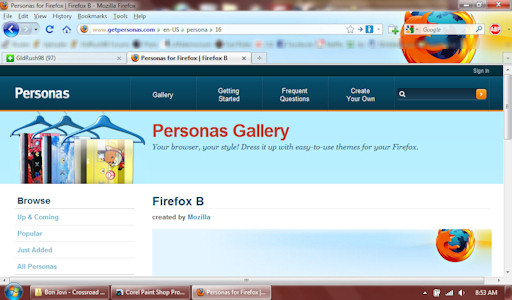
Here is Firefox’s Ugly Fat Theme (with Persona):
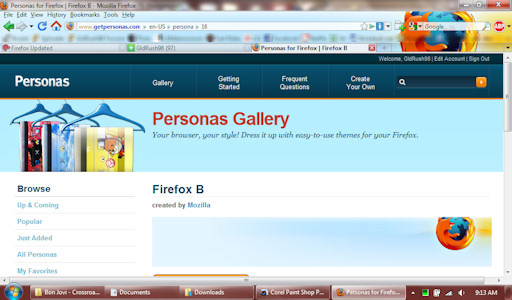
Here is my nice Classic Compact running with Persona in 3.5.7:
And here is how it looks in 3.6:
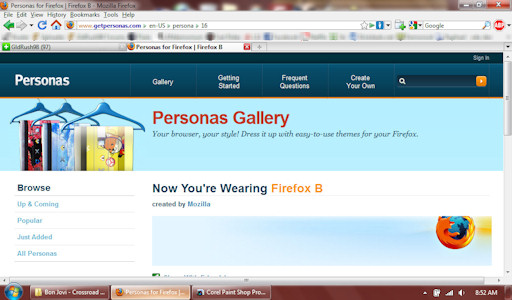
(I know from the screen shots it doesn’t look like that much of a difference in real estate, but when you’re stuck with 1024×600, every line of resolution you can reclaim helps!)

Share and Enjoy:
  • Digg
  • del.icio.us
  • Facebook
  • Google Bookmarks
  • MySpace
  • Netvibes
  • Twitter

9 Responses to “Firefox 3.6 Breaks Themes and Personas Coexistence”

  1. Brandon  Says:

    I didn’t know Personas was getting built into 3.6. It’s kind of neat, but, since I’ve had it, it seems like they update it all the time. I wonder if FF 3.6 will need to be updated just as often, just for Personas.

  2. Geekilized  Says:

    I am really pissed about this too. I hope they fix this soon because I like the personas but I want to keep my Noia 2 Extreme theme.

  3. Monimonika  Says:

    I’m also holding off on updating Firefox because of this. However, it seems you can still get the non-default theme and persona to mesh if you use an older version of the Persona addon in Firefox 3.6.

    Are you using Windows? You can save one whole row of space by moving your Bookmarks Toolbar Items up to the Menu row.

    I also recommend the Smart Bookmarks Bar addon to shrink those Bookmarks to just their favicons (I use Favicon Picker to individualize the non-folder favicons) while still being able to see their names on mouseover. Saves a ton of space for other stuff.

    Another addon I appreciate is Menu Editor to consolidate my menus to just the Bookmarks Menu and the Tools Menu (into which all the options I actually use have been moved from the other menus). Another space-saver (if you’re using Windows, of course).

    Even if you’re not on Windows, I found that the Toolbar Buttons addon provides button versions of the Menus which you can use in place of the entire Menu bar.

  4. Monimonika  Says:

    Oooh! And the experimental Hide Caption addon let’s me get rid of the entire Title bar! You can have the title of the window you’re in display in the Status Bar (if you have one).

    It also provides an alternative button for the Min/Max/Close, but I prefer to use the ones in the Toolbar Buttons addon because they take up less vertical space.

    So, compared to the your 5 rows (including Title Bar), I have only 3 rows (4 if you count the thin Status Bar). I also have a vertical column for more buttons thanks to All-In-One Sidebar.

  5. Nick - Author Comment:

    Yeah, there is a point for me though where it becomes TOO compact and becomes more of an inconvenience then an advantage. Even not having a status bar bugs me some times. I want the same layout as usual, just smaller, which is what Classic Compact gives me :)

  6. Monimonika  Says:

    Hi Nick,

    Yeah, I understand. We like things in our own ways. Thank you for responding.

    Hope Mozilla will make Personas and Themes compatible again. Until then, I’ll stick with the old Firefox until I’m forced to hack around in 3.6.

    Just to show off, here’s a link to what my browser currently looks like:

    http://img28.imageshack.us/img28/7726/onmy1280×800screen.png

  7. Nick - Author Comment:

    Woo, that IS compact. Haha, nice work.

  8. KrAzE  Says:

    Seriously this is what kept me from using firefox as my primary browser back when everyone loved it.. I dont want all that clutter.. 2 bars is almost too much for me. Even in IE I have all the buttons small setting and no words except for the title.

    Hell, if I could I would turn off this stupid search area I would be a happy man.. despite IE’s many flaws.

  9. Nick - Author Comment:

    It’s not really clutter, everything is useful. If you don’t like the bookmarks there you can turn them off with 2 clicks.
    Firefox’s rendering engine and security are far superior to IE which mangles web pages and breaks web standards. From a web developer’s point of view, I hate dealing with IE, but I’ll give Microsoft the recognition that they have fixed A LOT of IE’s problems with IE8.

Leave a Response


grunge